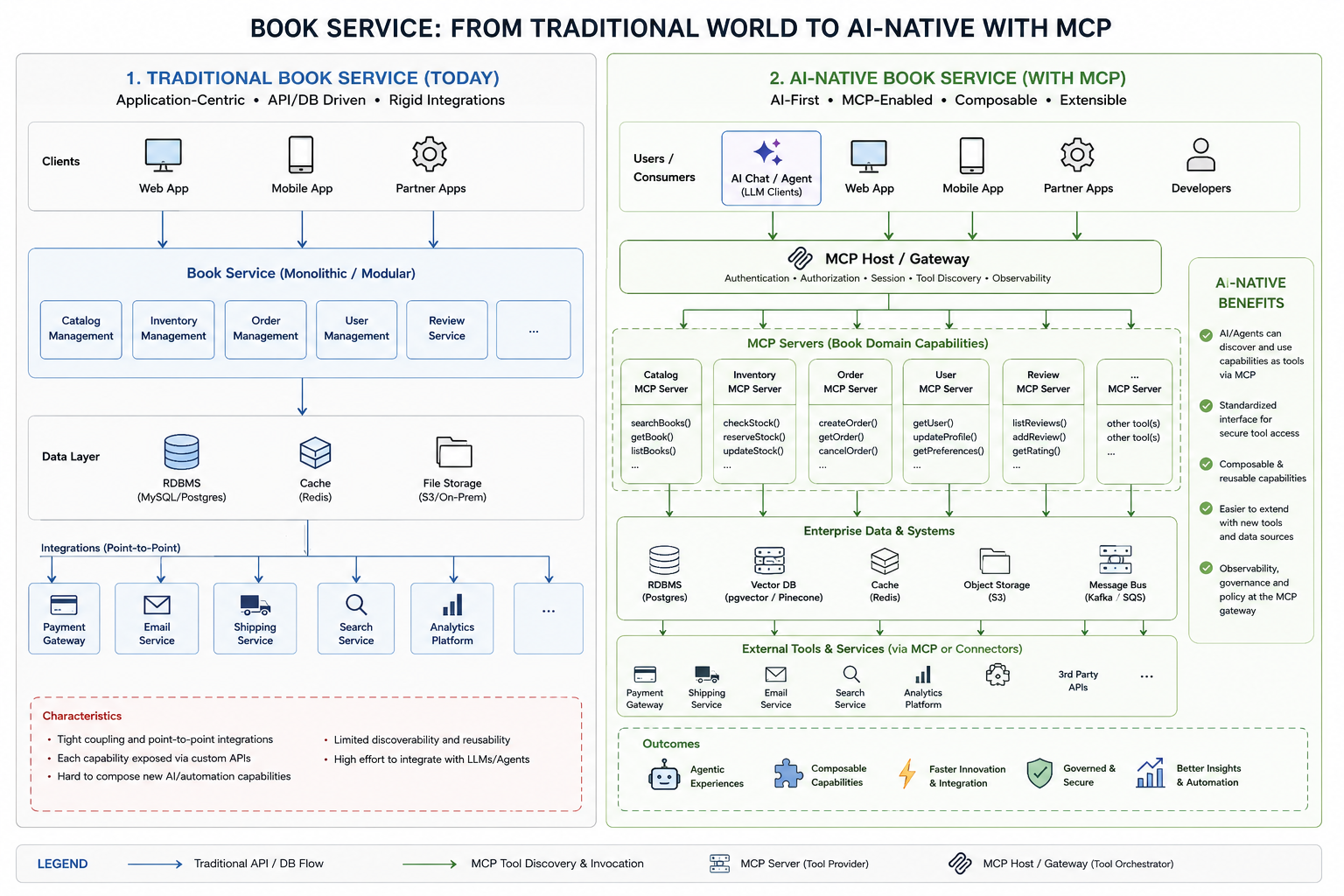
You've built a great book service. Catalog management, inventory checks, order flows, reviews — all exposed via clean REST APIs. Everything works. Then your team asks: "Can we add an AI assistant that lets users search, book, and manage reservations in natural language?"
Suddenly the clean architecture feels rigid. Your AI agent can't discover what APIs exist. It can't compose capabilities dynamically. Every new LLM integration means a new custom wrapper. This is the wall every traditional API-first service hits the moment it tries to go AI-native.
MCP is the bridge. Let's dig in.
1. The Traditional Book Service (Today)
Traditional architectures are application-centric. Clients — web, mobile, partner apps — talk directly to a monolithic or modular service via custom REST or GraphQL APIs. Each integration is hand-crafted and tightly coupled.
Clients (Web / Mobile / Partners)
          │
          │ Custom REST / GraphQL
          ▼
  Book Service (Monolithic / Modular)
  ├── Catalog Management
  ├── Inventory Management
  ├── Order Management
  ├── User Management
  └── Review Service
          │
          ▼
      Data Layer
  RDBMS · Cache (Redis) · File Storage (S3)
          │
          ▼
  Point-to-Point Integrations
  Payment · Email · Shipping · Search · Analytics
What's wrong with this picture?
Pain points: tight coupling where every client knows service internals, point-to-point integrations that explode with each new partner, undiscoverable APIs that LLMs can't introspect dynamically, and high effort per LLM integration — every AI use case means a new custom wrapper.
What to keep: battle-tested business logic, existing data models, current auth and permission system, monitoring stack, database infrastructure, and your team's domain knowledge.
The core problem: Traditional APIs were designed for human developers who read documentation and write integration code once. AI agents need to discover, understand, and compose capabilities dynamically — at runtime, with no prior knowledge of the system.
2. The AI-Native Book Service (With MCP)
The Model Context Protocol introduces a standardized layer between AI agents and your backend capabilities. Instead of hardwiring integrations, you expose capabilities as tools — self-describing, composable, and discoverable.
Users / AI Agents / Web / Mobile / Partners / Developers
          │
          ▼
  🔗 MCP Host / Gateway
  Auth · AuthZ · Session · Tool Discovery · Observability
          │
          │ MCP Tool Discovery & Invocation
          ▼
  ┌──────────────────────────────────────────────┐
  │ MCP Servers (Book Domain Capabilities)       │
  │  Catalog · Inventory · Order · User · Review │
  └──────────────────────────────────────────────┘
          │
          ▼
  Enterprise Data & Systems
  Postgres · pgvector · Redis · S3 · Kafka/SQS
          │
          ▼
  External Tools & Services (via MCP or Connectors)
  Payment · Shipping · Email · Search · Analytics
The Three Key Components
MCP Host / Gateway — Single entry point for all clients. Centralized auth & policy enforcement, tool discovery registry, session management, and unified observability. One enforced perimeter.
MCP Servers (Domain Capabilities) — Self-describing tools with schemas, independently deployable and scalable. They wrap your existing business logic — no rewrite. Versioned and backward compatible.
Tool Discovery — Any AI agent calls GET /mcp/tools, reads the schemas, and knows exactly what it can do and how. No custom integration layer needed.
3. Sample Project: Book Service with MCP
Let's make this concrete. Here's how you'd expose your existing book service capabilities as MCP tools — wrapping your current code, not replacing it.
Project Structure
book-service-mcp/
├── mcp_gateway/
│   ├── main.py          # FastAPI app — MCP host entry point
│   ├── auth.py          # JWT auth middleware
│   ├── registry.py      # Tool discovery registry
│   └── observability.py # Tracing / metrics
│
├── mcp_servers/
│   ├── catalog/
│   │   ├── server.py
│   │   └── tools.py     # searchBooks, getBook, listBooks
│   ├── inventory/
│   │   └── tools.py     # checkStock, reserveStock, updateStock
│   ├── order/
│   │   └── tools.py     # createOrder, getOrder, cancelOrder
│   └── review/
│       └── tools.py     # listReviews, addReview, getRating
│
├── services/            # ← Your EXISTING business logic (untouched)
│   ├── catalog_service.py
│   ├── inventory_service.py
│   └── order_service.py
│
└── docker-compose.yml
Defining an MCP Tool (Catalog Server)
# mcp_servers/catalog/tools.py
from mcp import Tool, ToolResult
from services.catalog_service import CatalogService  # existing service

# Tool is self-describing — the LLM reads this to understand when/how to call it
search_books_tool = Tool(
    name="searchBooks",
    description="""
      Search the book catalog by title, author, genre, or ISBN.
      Returns a list of matching books with availability and pricing.
      Use this when a user asks to find, browse, or discover books.
    """,
    input_schema={
        "type": "object",
        "properties": {
            "query": {"type": "string", "description": "Search term"},
            "genre": {"type": "string", "enum": ["fiction", "non-fiction", "sci-fi"]},
            "limit": {"type": "integer", "default": 10}
        },
        "required": ["query"]
    }
)

async def handle_search_books(args: dict) -> ToolResult:
    # Calls your existing service — no rewrite needed
    results = await CatalogService.search(
        query=args["query"],
        genre=args.get("genre"),
        limit=args.get("limit", 10)
    )
    return ToolResult(content=results.to_json())
The MCP Gateway
# mcp_gateway/main.py
from fastapi import FastAPI
from mcp.server.fastapi import MCPRouter

app = FastAPI(title="Book Service MCP Gateway")

# Mount each domain as a namespaced MCP server
app.include_router(MCPRouter(catalog_server),   prefix="/mcp/catalog")
app.include_router(MCPRouter(inventory_server), prefix="/mcp/inventory")
app.include_router(MCPRouter(order_server),     prefix="/mcp/orders")
app.include_router(MCPRouter(review_server),    prefix="/mcp/reviews")

# Tool discovery endpoint — AI agents call this first
@app.get("/mcp/tools")
async def list_all_tools():
    return registry.get_all_tools()  # returns schemas for all 15+ tools
AI Agent in Action (Zero Hardcoded Orchestration)
User: "Find me a sci-fi book by Isaac Asimov and place an order"

Step 1 → searchBooks(query="Isaac Asimov", genre="sci-fi")
Step 2 → checkStock(bookId="foundation-001", quantity=1)
Step 3 → createOrder(bookId="foundation-001", userId="u123")

Agent: "I found 'Foundation' by Asimov (in stock).
        Your order #ORD-8821 has been placed. ETA: 3–5 days."

// Zero hardcoded orchestration — the LLM composed this from tool descriptions alone.
Key insight: You didn't rewrite your catalog, inventory, or order services. You wrapped them in MCP tool definitions. The AI agent figured out the workflow by reading tool descriptions — just like a new developer reads API docs, but at machine speed.
Traditional REST vs MCP — Side by Side
| Dimension | Traditional REST API | MCP Tool |
|---|---|---|
| Discovery | Manual docs / OpenAPI spec | Runtime tool registry — LLM reads schemas live |
| Composition | Hardcoded in client code | LLM composes tool chains dynamically |
| Auth | Per-service implementation | Centralized at MCP Gateway |
| Versioning | v1, v2… breaking changes | Schema-first, backward compatible |
| Observability | Scattered across services | Unified trace at gateway level |
| AI readiness | Requires custom LLM wrappers | Native — any MCP client connects directly |
| New integrations | Weeks of custom work per partner | Hours — expose as MCP tool, done |
4. Why MCP? 7 Reasons That Actually Matter
01 — Discoverability. REST APIs require a human to read docs and write code. MCP tools are self-describing — an LLM client calls /mcp/tools, reads the schemas, and knows exactly what it can do. No custom integration layer needed.
02 — Composability. Search → check stock → reserve → place order. The agent chains tools based on user intent. You don't write orchestration logic — the LLM reasons through the workflow from tool descriptions alone.
03 — Standardization. Claude, GPT-4, Gemini, open-source LLMs — any MCP-compatible client connects to your gateway without code changes on your side. Build once, every AI agent benefits.
04 — Security. JWT verification, scoped permissions, rate limiting, and audit logging live at the MCP Gateway — one enforced perimeter. No more per-service auth drift where one team forgets a permission check.
05 — Extensibility. Add a new recommendBooks tool powered by a vector DB? Register it at the gateway. All AI clients see it automatically at next discovery. No client deployments, no version negotiations.
06 — Observability. Which tool did the agent call? What arguments? How long did it take? The gateway logs every invocation with a correlated trace ID. Full visibility into what your AI is actually doing — and why.
07 — Incremental Migration (Most Important). Your existing CatalogService, OrderService, InventoryService keep running exactly as they are. MCP is a thin adapter layer on top. Migrate domain by domain, ship value on day one, and never bet the company on a full rewrite.
5. How to Scale Your MCP Architecture
Step 1 — Start with the MCP Gateway as a Sidecar. Deploy the gateway alongside your existing service. Route AI agent traffic through MCP while human clients continue using REST. Zero disruption, immediate AI value.
Step 2 — Decompose Into Domain MCP Servers. Extract Catalog, Inventory, Orders, Reviews into independent MCP servers. Each team owns their server. The gateway becomes a router. Teams deploy and scale independently — no more merge conflicts on a shared monolith.
Step 3 — Add a Vector DB for Semantic Tool Routing. As your tool count grows past 50, add pgvector or Pinecone. The gateway embeds the user's intent and retrieves the top-k most relevant tools — avoiding context window overflow while keeping routing accurate.
Step 4 — Introduce Async Tools via Message Bus. Long-running operations become async MCP tools backed by Kafka/SQS. The agent calls triggerBulkOrder(), gets a job ID, and polls getJobStatus() — no timeouts, no blocking.
Step 5 — Multi-Tenant Gateway with Policy Engine. Expose your MCP gateway to partners and developers. Each API key gets a scoped tool manifest. OPA or Cedar handles policy at the gateway — Partner A sees only searchBooks and checkStock; Partner B gets full order management.
Scaling outcome: You go from one AI assistant to an ecosystem. Third-party developers build agents on your gateway. Partners integrate in hours not weeks. Internal teams ship AI features without touching the core service.
Recommended stack: Python 3.12 + FastAPI · Anthropic MCP SDK · PostgreSQL + pgvector · Redis · Kafka · Kubernetes + ArgoCD · OpenTelemetry · OPA
The Bottom Line
MCP doesn't ask you to throw away your existing book service. It asks you to expose it differently — through a protocol that AI agents can discover, reason about, and compose without human intermediation.
The teams that win the AI era won't be those who built the cleverest LLM prompts. They'll be the ones who structured their capabilities so that any agent — theirs or a third party's — can walk up and use them.
Your book service already has the domain logic. MCP is how you make it AI-native without starting over. Start with one domain, wrap it in an MCP server, connect an LLM client, and ship the demo. The architecture will speak for itself.