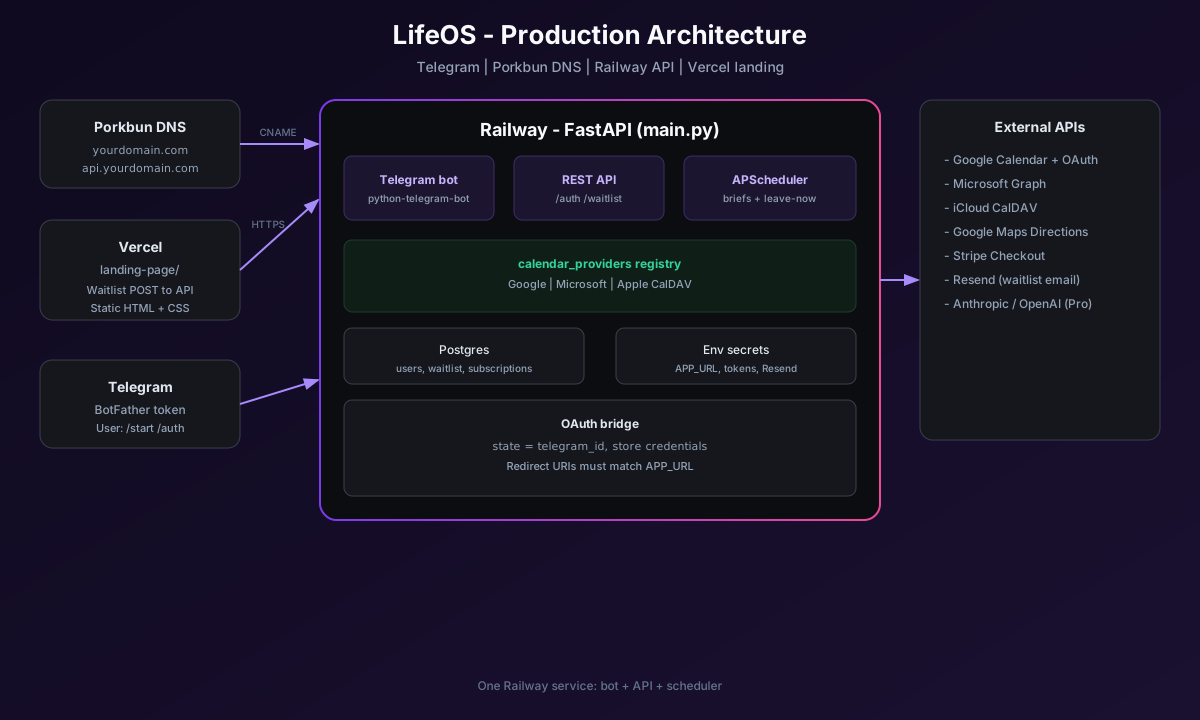
LifeOS is a proactive assistant in Telegram — it reads your calendar, checks traffic, and tells you when to leave. No app store install. I underestimated how long auth, timezones, and hosting would take; this guide is the condensed version.
Live: lifeos.yudira.buzz · Demo: LifeOS hobby agent
Using LifeOS
Get access — Join the waitlist with a Gmail address (same account you will use for Google Calendar). After approval, open the bot from the email link.
Setup (about five minutes)
- /start — opens the bot menu.
- /sethome your address — home base for drive-time estimates.
- /auth — link Google or Outlook in the browser; for Apple use /authapple with an app-specific password.
- /setbrieftime HH:MM — morning brief time (default 7:30).
- /timezone — confirm your zone; fix with /settimezone America/Chicago if needed.
Day to day — Read the morning brief. Wait for leave-now pings before events with a location. Optional: /upgrade for Pro (smarter briefs, evening summary).
If something breaks
- Google says access blocked → waitlist Gmail must match; you must be on the OAuth test-user list.
- Brief at wrong time → run /timezone then /settimezone.
- No leave alerts → check /sethome; calendar events need a real location.
How I host it
Four services, one product:
| Piece | Role |
|---|---|
| Telegram | BotFather token; users chat here only. |
| Porkbun | DNS: main domain → Vercel, api subdomain → Railway. |
| Railway | Python app, Postgres, bot polling, OAuth callbacks, scheduler. |
| Vercel | Static landing page + waitlist form posting to Railway. |
Railway essentials — Set APP_URL to your API host (e.g. https://api.yourdomain.com), TELEGRAM_BOT_TOKEN, maps and OAuth secrets, WAITLIST_CORS_ORIGINS to your Vercel URL, and Resend for approval email (not SMTP).
OAuth — Google and Azure redirect URIs must match APP_URL exactly. Users are identified by Telegram; calendar access is a separate browser grant tied to their chat id.
Rule I learned — One bot token, one running server. Use a test bot locally so production links never point at localhost.
Shipping notes
- Align every redirect URL (Google, Microsoft, Stripe) with APP_URL.
- Send Telegram messages with links as plain text (formatted text breaks URLs).
- Verify /timezone after every calendar connect.
- Add each approved Gmail to Google Cloud test users before they hit /auth.
More detail on the LifeOS hobby agent page including architecture and demo video.